Counter-Strike 2’s beta release has encountered several issues, including FPS discrepancies and frustrating input lag problems not present in its predecessor, CS:GO. Given the precision required in the game, addressing input lag is crucial for players.
To mitigate input lag in Counter-Strike 2, the community has found effective solutions. One method involves adjusting settings in the NVIDIA Control Panel for those with higher FPS:
- Open the NVIDIA Control Panel.
- Navigate to “Manage 3D Settings” in the 3D settings tab.
- Select “Program Settings” and add or locate the Counter-Strike 2 executable file.
- Find “Low Latency Mode” and ensure it’s turned on.
While this fix may not resolve all input lag issues, many players have reported improved performance and reduced input lag using this method.
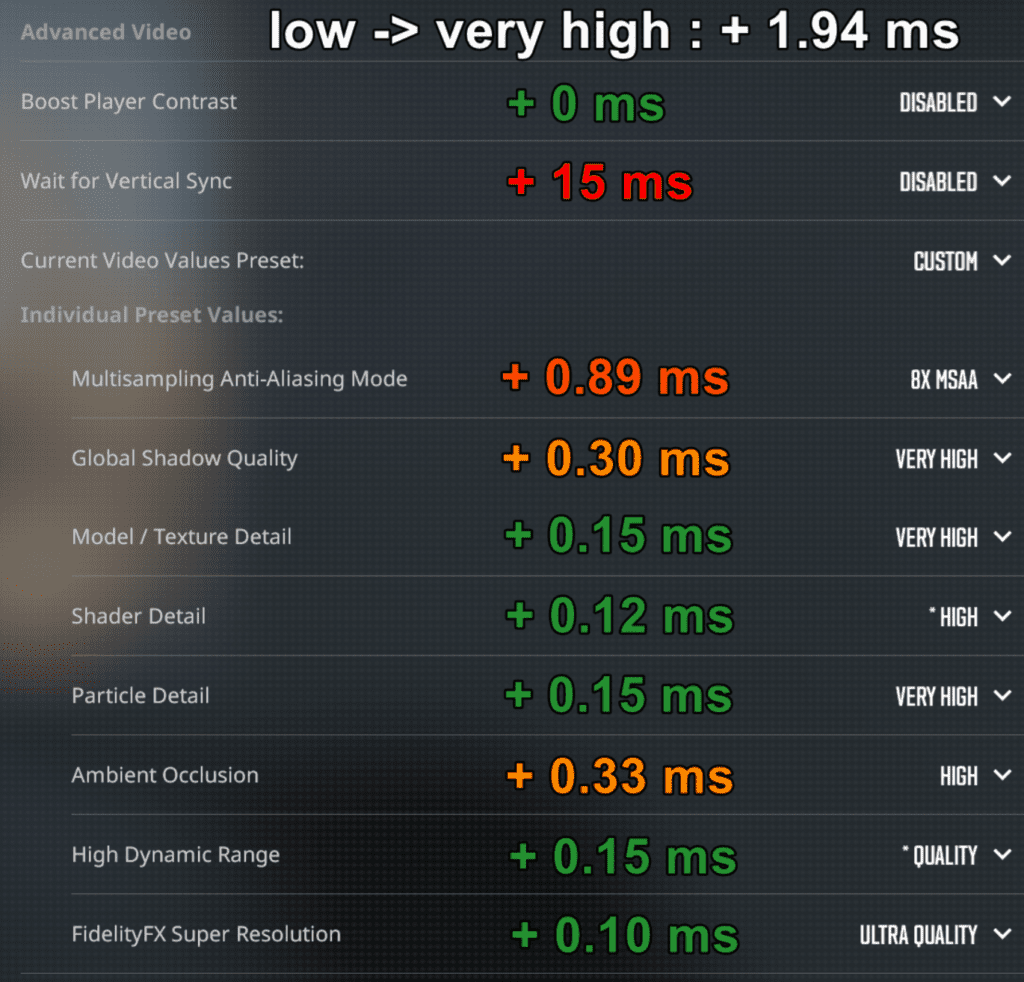
Another solution comes from player Piwielle’s testing, which identified Vertical Vsync as a major contributor to input lag, adding 15 milliseconds. Disabling Vertical Vsync is recommended to reduce input lag and improve frame rates.
Additionally, setting Multisampling Anti-Aliasing to 8x MSAA, which introduces only 0.89 milliseconds of input lag, is preferable to leaving it off. It’s advisable to keep Global Shadow Quality and Ambient Occlusion off as they add 0.30 ms and 0.33 ms of input lag, respectively.
While these fixes can help alleviate input lag issues in Counter-Strike 2, players may still need to await future updates from Valve for a more comprehensive resolution.