After a somewhat rocky launch, Microsoft Flight Simulator 2024 has taken off in full force, with early server issues now resolved and several updates smoothing out bugs. Whether you’re returning to the game or taking to the skies for the first time, the game offers plenty of customization options, allowing you to adjust settings for a personalized flying experience. Among the most exciting features is the ability to control both the weather and time of day, adding layers of realism or challenge to your flight.
In this guide, we’ll walk you through how to change the weather and time of day, both before and during your flights in Microsoft Flight Simulator 2024.
How to Change Weather & Time of Day Before Your Flight
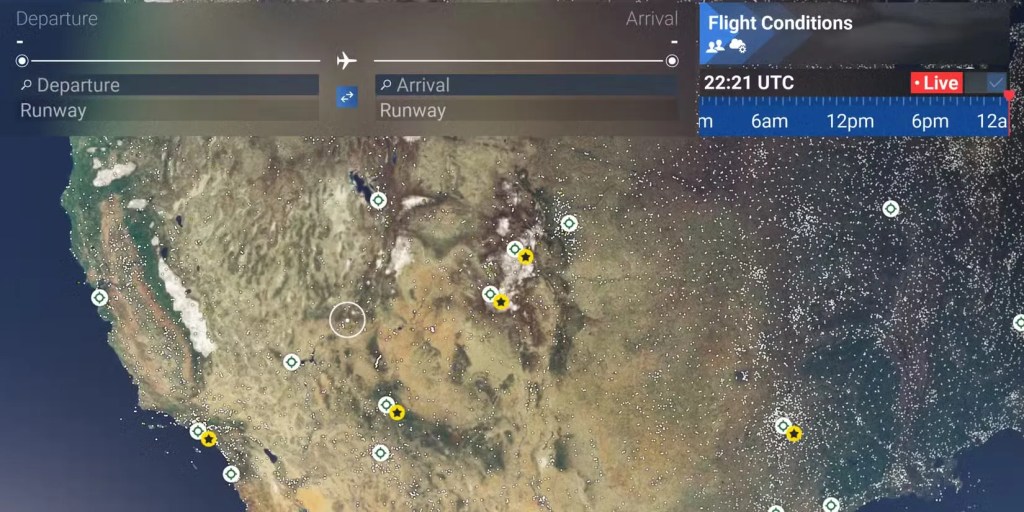
To adjust the weather and time of day before you take off, follow these steps:
- Select Free Flight Mode
Launch Microsoft Flight Simulator 2024 and choose Free Flight. This mode allows you to select any aircraft and fly anywhere in the world. - Access the Flight Conditions Settings
Once you’ve chosen your aircraft and plotted your route on the map, look to the top right corner of the screen. You’ll see the Flight Conditions panel, including a clock showing the current time. - Customize the Time of Day
By default, the clock will be set to Live, meaning the game simulates real-world time. To change this, click on the clock and turn off Live mode. This allows you to manually adjust the time of day to suit your preferences, whether you’re flying through a sunny midday sky or a moonlit night. - Adjust the Weather
Next, click on Flight Conditions to access more weather options:- Live: This will keep the weather conditions in sync with real-world locations.
- Preset: Choose from various pre-made weather patterns, such as clear skies, thunderstorms, or overcast skies.
- Custom: For ultimate control, the Custom setting lets you tweak the weather to your liking. Adjust temperature, wind, cloud density, precipitation, humidity, and more. You can even control weather settings at specific altitudes, making each flight completely unique.
How to Change Weather & Time of Day Mid-Flight
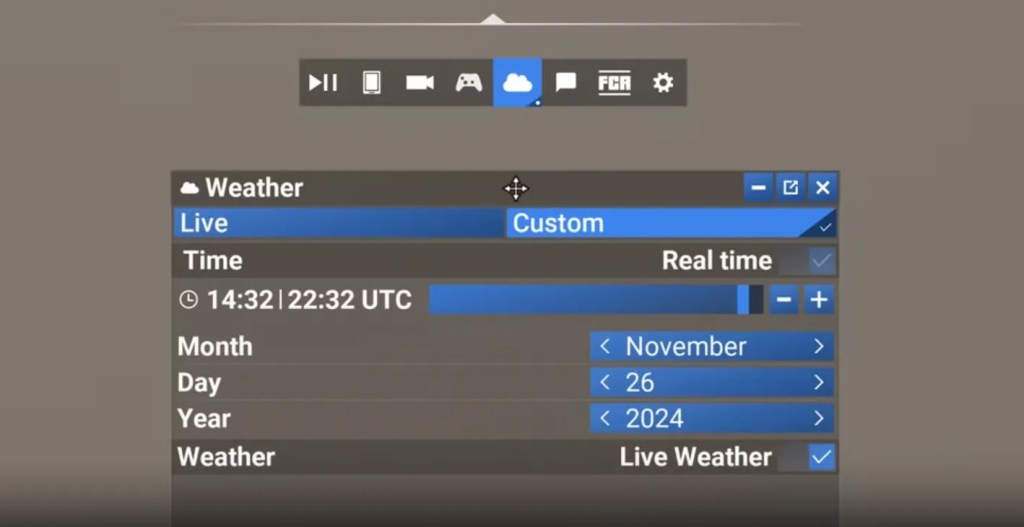
You can also modify the weather and time of day while in the air, allowing for dynamic flight experiences as you fly.
- Access Weather Settings in Flight
While flying, move your mouse to the top of the screen (on PC) to bring up the weather icon, which looks like a small cloud. On XBOX, press RB + L3 to activate cursor mode. - Modify Weather and Time
After clicking on the weather icon, you’ll be able to adjust the weather conditions and time of day as you wish. Whether you want to experience a sudden storm or switch to twilight, the option is yours. Note: Changing weather or time during flight may cause a temporary lag as the game adjusts, so be mindful of this if you’re in a critical phase of flight.
Tips for a Seamless Experience
- Performance Impact: Keep in mind that adjusting weather and time, especially during flight, may cause a slight slowdown as the simulation loads the new conditions. If you’re flying in a dense area or during a large change, such as moving from clear skies to a heavy storm, expect a brief stutter.
- Creative Flights: The flexibility to manipulate weather and time opens up endless possibilities. Imagine flying over the Great Pyramids during a snowstorm or navigating through Manhattan’s skyline at sunset. The ability to set these conditions enhances your immersion in the game and challenges your piloting skills.
Conclusion: Microsoft Flight Simulator 2024 continues to deliver a deeply immersive flying experience with plenty of customization options. Whether you’re setting the stage for your flight or altering the conditions mid-air, adjusting the weather and time of day allows you to craft your perfect virtual flight. As you continue to soar through the skies, the ability to control every aspect of your environment adds an exciting layer to the simulation.