
Optimizing Counter-Strike 2 Low-End PC Settings for Smooth Gameplay
To get the best out of Counter-Strike 2 low-end PC settings, you need to tweak and adjust the game’s settings to achieve smooth gameplay. In this guide, we’ll walk you through the step-by-step process to optimize your game experience.
Understanding Your Hardware Limitations
Before we dive into the settings, it’s essential to understand your hardware limitations. If you’re playing on a low-end laptop with an i5 processor, 8GB RAM, and an RTX 2050 graphics card, you’ll need to adjust your expectations accordingly. You can expect to get around 20-120 FPS, but with the right settings, you can improve your gameplay experience.
Step-by-Step Guide to Optimizing Counter-Strike 2 Low-End PC Settings
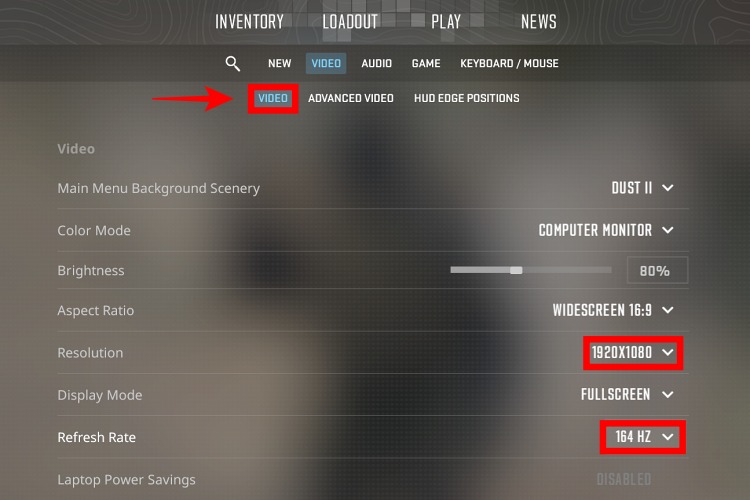
- Adjust Your Resolution: Set your resolution to 1280×960 (4:3) to reduce the strain on your graphics card. This will help improve your FPS and provide a smoother gaming experience.
- Lower Global Shadow Quality: Set your Global Shadow Quality to Medium to balance out the graphics and performance. This will help reduce the load on your graphics card and improve your FPS.
- Disable Advanced Video Settings: Disable all other advanced video settings or set them to Low to minimize the strain on your hardware. This will help improve your FPS and provide a smoother gaming experience.
- Adjust Your Graphics Settings: Set your graphics settings to the “Low-End PC” preset to optimize your game experience. This preset is designed to provide the best balance between graphics and performance.
Pro Tips for Optimizing Counter-Strike 2 Low-End PC Settings
To get the most out of your Counter-Strike 2 low-end PC settings, follow these pro tips:
- Close any unnecessary programs or background applications to free up system resources.
- Update your graphics drivers to the latest version to ensure you have the best performance.
- Adjust your power settings to “High Performance” to prioritize your gaming experience.
Frequently Asked Questions
Here are some frequently asked questions about optimizing Counter-Strike 2 low-end PC settings:
Q: What is the best resolution for low-end PCs?
A: The best resolution for low-end PCs is 1280×960 (4:3) as it provides a good balance between graphics and performance.
Q: How can I improve my FPS in Counter-Strike 2?
A: You can improve your FPS by adjusting your graphics settings, closing unnecessary programs, and updating your graphics drivers.
Q: What are the best settings for a low-end laptop with an RTX 2050 graphics card?
A: The best settings for a low-end laptop with an RTX 2050 graphics card are the “Low-End PC” preset, with a resolution of 1280×960 (4:3) and Global Shadow Quality set to Medium.
Final Thoughts
Optimizing your Counter-Strike 2 low-end PC settings can make a significant difference in your gaming experience. By following the steps outlined in this guide and adjusting your settings accordingly, you can achieve smooth gameplay and improve your overall performance. Remember to always keep your graphics drivers up to date and adjust your power settings to prioritize your gaming experience. With the right settings and a little tweaking, you can enjoy a seamless gaming experience on your low-end PC.