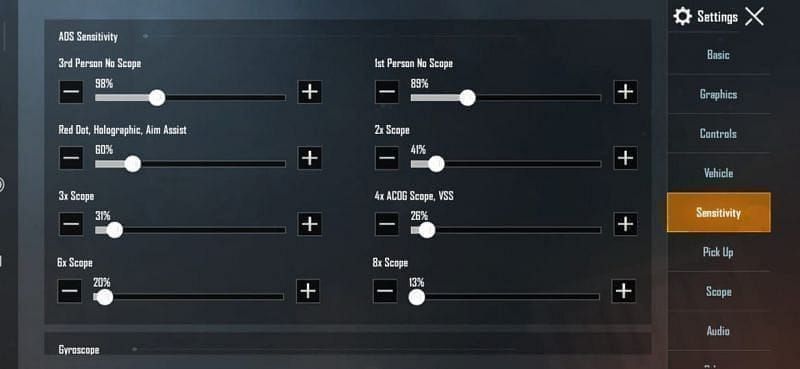

Optimizing PUBG Mobile Sensitivity Settings for Zero Recoil
To achieve zero recoil in PUBG Mobile, players must fine-tune their sensitivity settings, and the best approach involves experimenting with different settings to find what works best for each individual. The PUBG Mobile sensitivity settings zero recoil can be customized to improve aiming and overall gameplay experience.
When it comes to sensitivity settings, there is no one-size-fits-all solution. Many players suggest starting with a sensitivity of around 30-35% for the 3x scope, while 4x scopes can be slightly higher. The key is to experiment with different settings and find the perfect balance for your device and playstyle.
Understanding the Basics of Sensitivity Settings
Before diving into the world of zero recoil sensitivity settings, it’s essential to understand the basics. The sensitivity settings in PUBG Mobile control how fast or slow your character’s camera moves. A higher sensitivity setting means faster camera movement, while a lower setting results in slower movement.
The most critical aspect of sensitivity settings is finding the right balance between speed and control. If your sensitivity is too high, you may struggle with accuracy, while a setting that’s too low can make your character feel sluggish.
Step-by-Step Guide to Optimizing Sensitivity Settings
Here’s a step-by-step guide to help you optimize your sensitivity settings for zero recoil:
- Start by adjusting your camera sensitivity settings. A good starting point is around 20-25% for the camera sensitivity.
- Next, adjust your ADS (Aim Down Sight) sensitivity settings. For most scopes, a sensitivity setting between 20-30% is a good starting point.
- Experiment with different sensitivity settings for each scope. For example, you may want to use a higher sensitivity setting for the 4x scope and a lower setting for the 6x scope.
- Don’t forget to adjust your gyroscope settings. The gyroscope helps with aiming and can be adjusted to improve your overall accuracy.
- Finally, practice and fine-tune your sensitivity settings. It may take some time to find the perfect balance, but it’s essential to experiment and adjust your settings accordingly.
Pro Tips for Achieving Zero Recoil
To achieve zero recoil in PUBG Mobile, follow these pro tips:
- Use the right sensitivity settings for your device and playstyle. What works for one player may not work for another.
- Practice your aiming and movement. The more you practice, the better you’ll become at controlling your character’s movement and aiming.
- Use the gyroscope to your advantage. The gyroscope can help with aiming and movement, but it can also be adjusted to improve your overall accuracy.
- Stay up-to-date with the latest sensitivity settings and codes. The PUBG Mobile sensitivity settings zero recoil are constantly evolving, and staying informed can help you stay ahead of the competition.
The PUBG Mobile sensitivity settings zero recoil can be customized using various codes and settings. Some popular codes include 1-7435-8846-3421-0303-0728 and 1-7462-2496-3022-3831-210. These codes can be used to achieve balanced control and improve your overall aiming experience.
Frequently Asked Questions
Here are some frequently asked questions about PUBG Mobile sensitivity settings zero recoil:
Q: What are the best sensitivity settings for zero recoil in PUBG Mobile?
A: The best sensitivity settings for zero recoil in PUBG Mobile vary depending on the player’s device and playstyle. However, a good starting point is around 30-35% for the 3x scope and 20-25% for the camera sensitivity.
Q: How do I import sensitivity settings codes in PUBG Mobile?
A: To import sensitivity settings codes in PUBG Mobile, go to the settings menu and select the “Sensitivity” option. From there, you can enter the code and adjust the settings accordingly.
Q: Can I use the same sensitivity settings for all scopes in PUBG Mobile?
A: No, it’s not recommended to use the same sensitivity settings for all scopes in PUBG Mobile. Different scopes require different sensitivity settings to achieve optimal results. Experiment with different settings to find the perfect balance for each scope.