


EA Sports FC 24 has arrived with Early Access for Premium Edition buyers, and the Ultimate Team (FUT) mode is off to an exciting start with promotions like Nike Mad Ready and the Kevin De Bruyne Flashback SBC. As with every installment, players can create their own club, customize kits, stadiums, logos, and build their squad to compete with other fans.
When starting in FUT, players can choose their club’s badge, name, and kit. However, some might want to change their club’s name later on. Luckily, EA allows players to rename their club, and here’s how:

- Go to the main menu and enter Ultimate Team mode.
- Stay in the Home section, then press RB on Xbox, R1 on PlayStation, or C on PC to scroll right to various subsections.
- Click on Settings, then scroll right and select Rename Club.
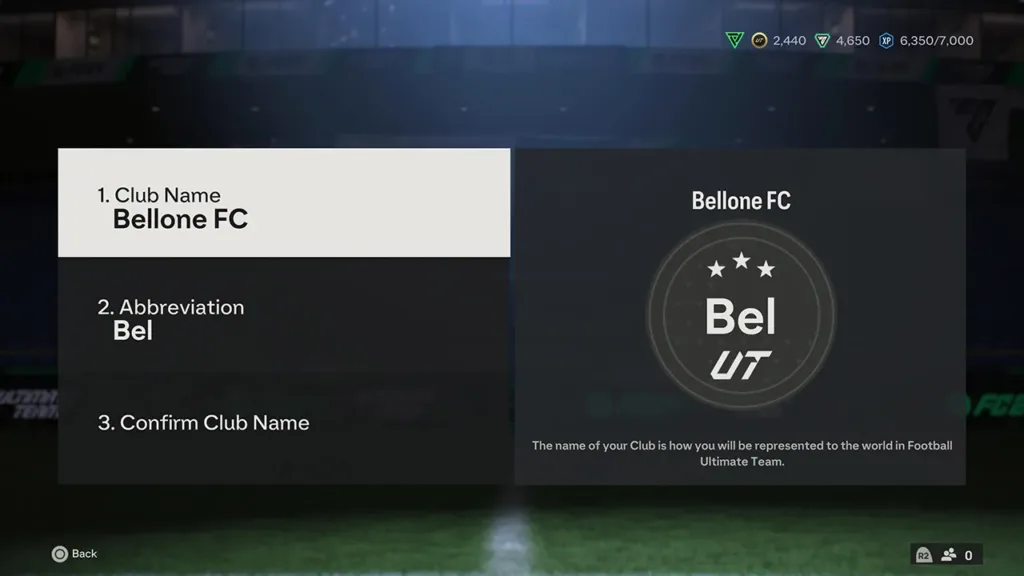
- A new screen will appear, allowing players to set the full name of their club, choose a nickname, and confirm the changes.

The full name can have up to 15 characters, while the nickname is limited to three characters, and special characters cannot be used. This flexibility allows players to tailor their FUT experience throughout the game’s annual cycle.
EA Sports FC 24 brings a fresh experience to the football simulator series, introducing gameplay improvements, the Frostbite engine, and the inclusion of both male and female footballers in FUT clubs, offering more customization and immersion for players.
While rewards have been noted as more appealing compared to FIFA 23, EA Sports FC 24 is available through Early Access on various platforms, with the full release scheduled for September 29, including the Nintendo Switch.


