• About
  • Advertise
  • Privacy & Policy
  • Contact
Console Chronicle
  • Home
  • PC
  • PlayStation
  • Xbox
  • Nintendo Switch
  • Mobile
  • Esports
  • Anime and Manga
No Result
View All Result
  • Home
  • PC
  • PlayStation
  • Xbox
  • Nintendo Switch
  • Mobile
  • Esports
  • Anime and Manga
No Result
View All Result
Console Chronicle
No Result
View All Result

Cities: Skylines 2 Traffic Tips – Mastering the Art of Roundabouts

owaizkh by owaizkh
April 12, 2025
in PC
0 0
0
0
SHARES
37
VIEWS
Share on FacebookShare on Twitter

Learn How to Efficiently Implement Roundabouts in Cities: Skylines 2 for Smooth Traffic Flow
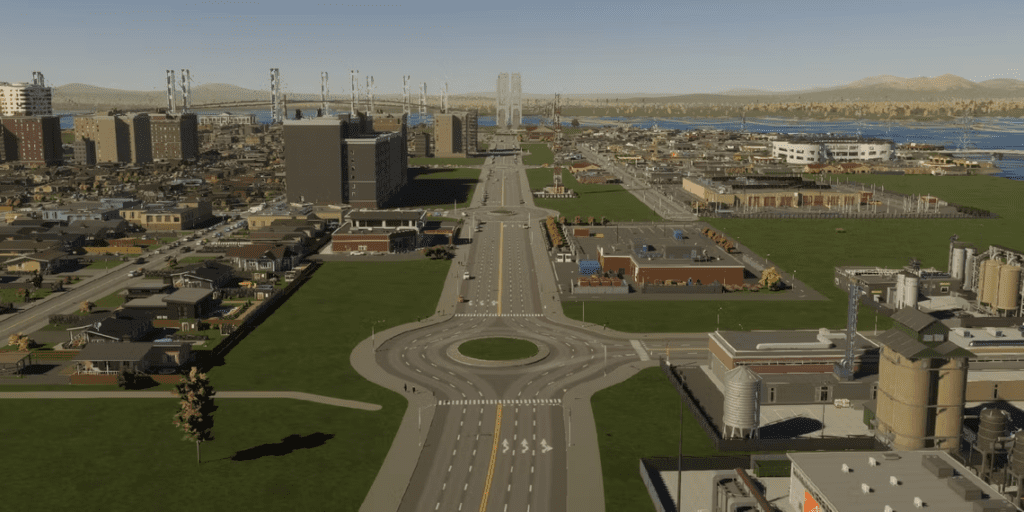
In both real world city planning and the virtual realm of Cities: Skylines 2, roundabouts serve as vital tools for efficient traffic management. They keep the traffic flowing, minimizing wait times and congestion at intersections. This guide will teach you how to effectively incorporate round abouts into your city in Cities: Skylines 2.

Leveraging the Roundabout Tool:
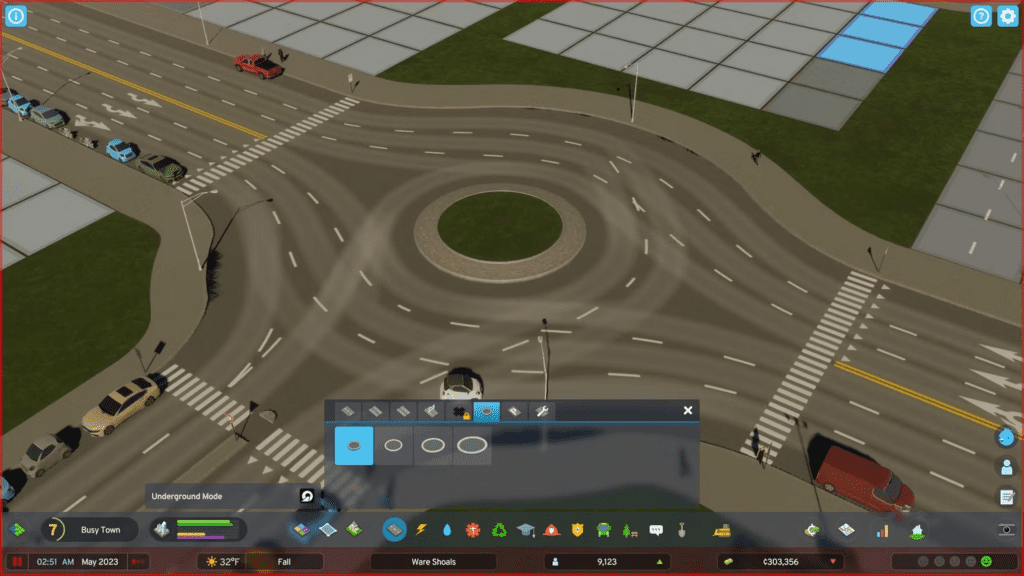
Cities: Skylines 2 simplifies the process of adding round abouts with a dedicated feature in the roads tab. Follow these steps to deploy a roundabout with ease:

  1. Open the road construction menu and navigate to the round abouts tab.
  2. Select the appropriate roundabout size for your intersection needs.
  3. Place the round about tool over the desired intersection.

This simple process transforms the intersection into a round about, enhancing traffic flow. Remember that larger round abouts are ideal for busy intersections involving wider roads, as they encourage vehicles to slow down and yield to others.

Note: Roundabouts consume substantial space, and adjacent buildings may overlap them. To avoid this, relocate civic structures near the intersections before implementing roundabouts. Also, round abouts lack zoning squares, so refrain from zoning next to intersections.

Creating Manual Roundabouts:
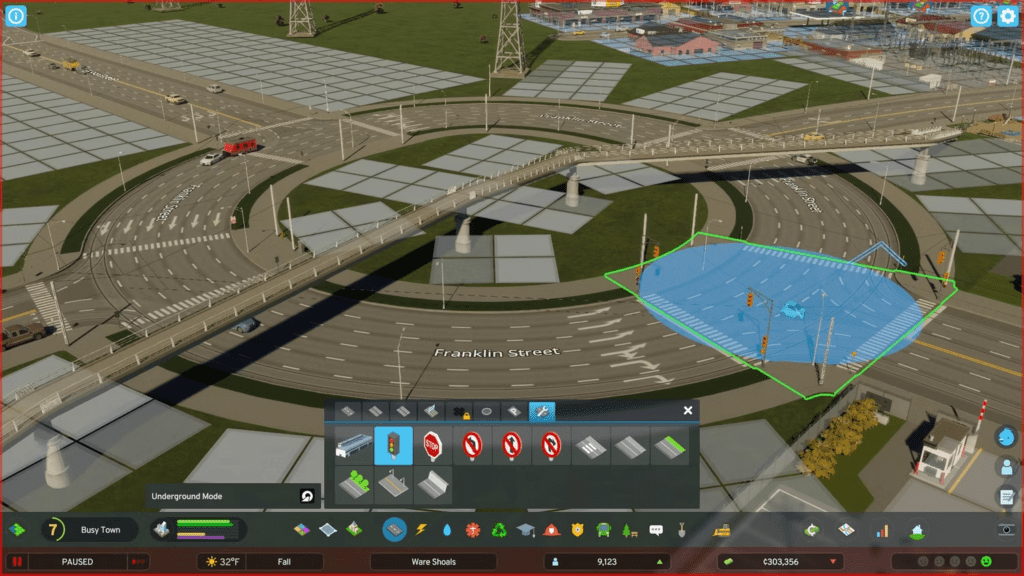
For more control over your roundabout design, follow these steps:

  1. Utilize the curved road tool to create a circular one-way road. You can choose the road size, from a small two-lane road to a wide highway.
  2. Unlock Advanced Road Services for one development point, allowing you to customize intersection signals and remove default stoplights.
  3. Access the Advanced Road Services tab and select stoplights. Hover over each intersection of the roundabout and remove stoplights by hitting the cancel button (usually the right mouse button on PC). This action replaces them with “Yield” signs.
  4. Refrain from zoning squares adjacent to your manually created roundabouts to ensure smooth traffic flow.
  5. Customize your roundabout surroundings with features like grass, trees, or wide sidewalks to prevent illegal parking.

Manually designed roundabouts are most effective at highway intersections, where traffic tends to accumulate. The extra space accommodates vehicles as they await entry or exit.

Incorporating roundabouts into your city planning in Cities: Skylines 2 can enhance traffic efficiency, but remember to account for their spatial requirements and adjust your city layout accordingly.

Share this:

  • Share on Facebook (Opens in new window) Facebook
  • Share on X (Opens in new window) X

Like this:

Like Loading...

Related

Tags: Cities: Skylines 2Gaming tipsParadox InteractivePc gaming
Previous Post

Stardew Valley: Savor the Flavor of Fried Calamari with This Cooking Guide

Next Post

Modern Warfare 3 Season 1: What to Expect and When to Anticipate Its Arrival

owaizkh

owaizkh

Next Post

Modern Warfare 3 Season 1: What to Expect and When to Anticipate Its Arrival

Leave a ReplyCancel reply

Latest - Anime & Manga

Amazon introduces AI-made English dubbing for Banana Fish

Amazon introduces AI-made English dubbing for Banana Fish

December 1, 2025
New Girls Band Cry movie officially announced

New Girls Band Cry movie officially announced

September 24, 2025
DAN DA DAN Season 3

DAN DA DAN Season 3 Officially Announced

September 23, 2025

Jujutsu Kaisen Season 3 Trailer Confirms Split Release, Premieres January 2026

September 19, 2025
DAN DA DAN: Evil Eye Sets Early Fan Screening Dates in the Philippines

DAN DA DAN: Evil Eye Sets Early Fan Screening Dates in the Philippines

May 22, 2025
Takopi’s Original Sin Unveils Main Visual, Trailer, June 28 Release, and 6 Episodes Total

Takopi’s Original Sin Unveils Main Visual, Trailer, June 28 Release, and 6 Episodes Total

May 22, 2025
Console Chronicle

© 2026 JNews - Premium WordPress news & magazine theme by Jegtheme.

Navigate Site

  • Home
  • PC
  • PlayStation
  • Xbox
  • Nintendo Switch
  • Mobile
  • Esports
  • Anime and Manga

Follow Us

Welcome Back!

Login to your account below

Forgotten Password? Sign Up

Create New Account!

Fill the forms below to register

All fields are required. Log In

Retrieve your password

Please enter your username or email address to reset your password.

Log In

Add New Playlist

No Result
View All Result
  • Home
  • PC
  • PlayStation
  • Xbox
  • Nintendo Switch
  • Mobile
  • Esports
  • Anime and Manga

© 2026 JNews - Premium WordPress news & magazine theme by Jegtheme.

Discover more from Console Chronicle

Subscribe now to keep reading and get access to the full archive.

Continue reading


Loading Comments...
 

    %d