Players can alter the setting of their game play in SteamWorld Build by switch between different thematic environments. Here’s how to make the change.
The SteamWorld series, renowned for its post-apocalyptic desert setting, continues its trend in SteamWorld Build. Set in a deserted world, players must manage a city while delving into underground realms to unearth ancient technology. Recently, developers introduced an interesting twist to SteamWorld Build by incorporating diverse game themes, providing players with a chance to experience varying environments.
For those interested in altering the gameplay environment of SteamWorld Build, understanding the process of changing game themes can offer a refreshing experience. This guide will walk players through the steps to modify their game themes and explore different atmospheres.
How to Change SteamWorld Build Game Theme

The default desert theme in SteamWorld Build encapsulates the series’ distinctive vibe, but the introduction of multiple themes offers players a chance to explore new visual settings. Players can opt for their preferred theme during initial game creation or later by accessing the Options menu while in-game, selecting the Graphics tab, and choosing the desired Theme option.
It’s essential to note that altering the theme serves purely as a cosmetic modification, influencing the visual aesthetics without impacting the city’s functionality or gameplay mechanics.
Available Theme Selection

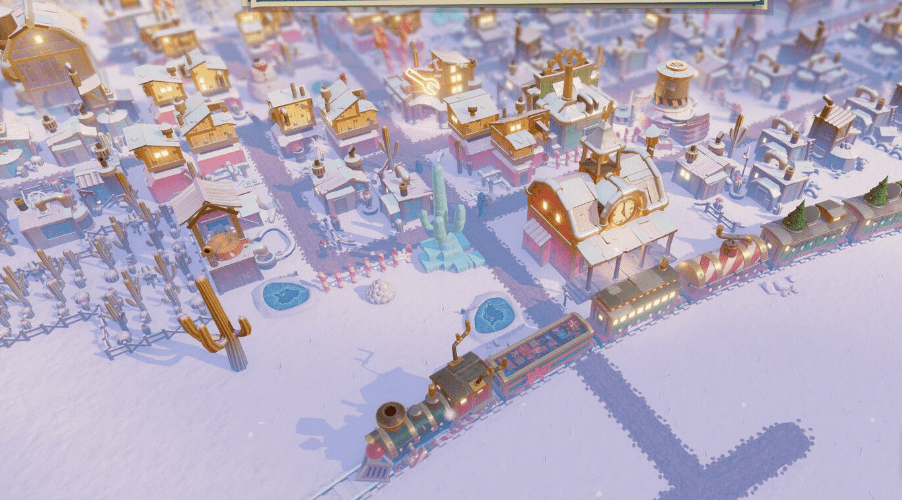
Presently, SteamWorld Build offers a limited array of themes. The recent addition of the Jingle Bolts theme coincided with the holiday season, transforming the post-apocalyptic setting into a delightful winter scene.
Expectations for Future Themes
As the game evolves through updates, it’s likely that more themes will be introduced to SteamWorld Build. Future updates may bring diverse themes for various occasions, such as Halloween or other events, providing players with additional options to customize their gameplay environment.
While awaiting new themes, players can immerse themselves in the Jingle Bolts theme, experiencing the whimsical winter landscapes. For those who prefer the classic SteamWorld ambiance, reverting to the default theme offers the familiar warmth of the franchise’s established setting.