• About
  • Advertise
  • Privacy & Policy
  • Contact
Console Chronicle
  • Home
  • PC
  • PlayStation
  • Xbox
  • Nintendo Switch
  • Mobile
  • Esports
  • Anime and Manga
No Result
View All Result
  • Home
  • PC
  • PlayStation
  • Xbox
  • Nintendo Switch
  • Mobile
  • Esports
  • Anime and Manga
No Result
View All Result
Console Chronicle
No Result
View All Result

Mastering Counter-Strike 2: A Comprehensive Guide to Utilizing Demos for Gameplay Analysis and Improvement

Estiyak by Estiyak
April 12, 2025
in PC
0 0
0
0
SHARES
3
VIEWS
Share on FacebookShare on Twitter

The demo feature in Counter-Strike 2 (CS2) is a robust tool that enables players to record and review their matches, offering valuable insights for skill improvement and learning from others. Leveraging the demo feature can significantly elevate your CS2 gameplay. Here’s a concise guide to utilizing the Demos feature in Counter-Strike 2 for effective analysis:

How Demos Feature Works in CS2
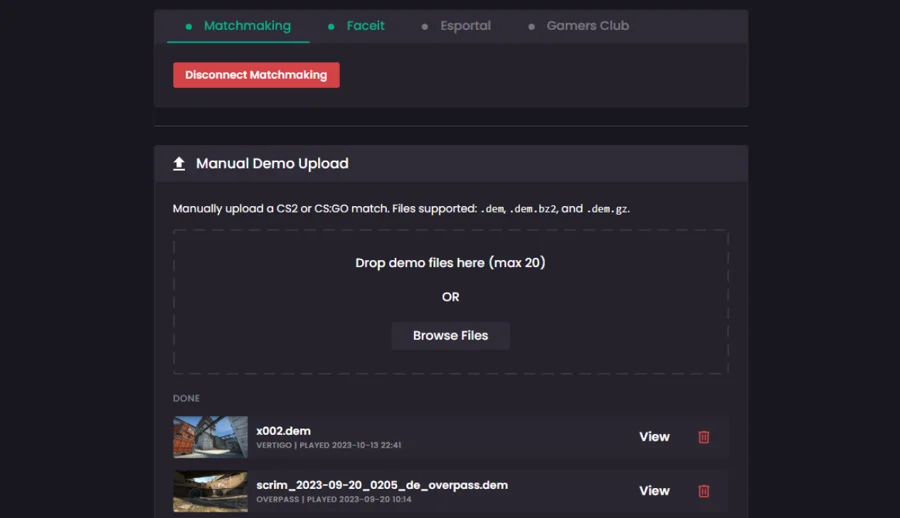
The demo feature in CS2 empowers players to record and rewatch their matches, facilitating gameplay analysis, skill enhancement, and learning from peers. To record a demo, access the developer console, and input “record” followed by the demo file name. Play the game as usual, then type “stop” in the console to end the recording. After recording, you can download or view the demo.

Using Demos Feature to Analyze Gameplay

Through Steam:

  1. Log in to Steam via a web browser.
  2. Navigate to your profile and choose “Games.”
  3. Locate Counter-Strike: Global Offensive and click on it.
  4. Under “Personal Game Data,” select “Premier Matches.”
  5. Choose the desired match and click “Download GOTV Replay.”

In-Game:

  1. Open Counter-Strike 2 and type “playdemo” followed by the demo file name in the console.
  2. If the demo file isn’t in the CS2 folder, specify the file path.
  3. The demo should load, displaying the new demo UI with the demoui command.

Playback Controls in Counter-Strike 2 Demos

Various commands are available to control gameplay demo playback in Counter-Strike 2. Use the playback controls at the bottom of the screen to manage demo playback, including pause, play, rewind, fast-forward, and round-specific skips. Additionally, utilize free camera mode for a dynamic view of the map and action.

  • Use “playdemo” followed by the demo name to play demos.
  • Adjust playback speed with the “speed” command.
  • Open the demo UI using the “demoui” command.
  • Spectate a specific player with the “follow” command.
  • Freeze the action at a specific point using “freezecam.”
  • Display only death notices in the demo with “cl_draw_only_deathnotices 1.”

For the latest gaming updates and news, don’t forget to visit our dedicated gaming page. GAMING UPDATES Stay informed and level up your gaming experience with our fresh content!

Share this:

  • Share on Facebook (Opens in new window) Facebook
  • Share on X (Opens in new window) X

Like this:

Like Loading...

Related

Tags: Counter Strike 2Demo controlsDemos featureGaming newsGaming UpdatesGuides
Previous Post

Marvel Snap: Mastering Martyr’s Unique Synergies for the Best Deck Strategy

Next Post

Kingdoms of Ruin Episode 7: Unveiling Release Date, Timing, Viewing Platform, and Additional Details

Estiyak

Estiyak

Next Post

Kingdoms of Ruin Episode 7: Unveiling Release Date, Timing, Viewing Platform, and Additional Details

Leave a ReplyCancel reply

Latest - Anime & Manga

Amazon introduces AI-made English dubbing for Banana Fish

Amazon introduces AI-made English dubbing for Banana Fish

December 1, 2025
New Girls Band Cry movie officially announced

New Girls Band Cry movie officially announced

September 24, 2025
DAN DA DAN Season 3

DAN DA DAN Season 3 Officially Announced

September 23, 2025

Jujutsu Kaisen Season 3 Trailer Confirms Split Release, Premieres January 2026

September 19, 2025
DAN DA DAN: Evil Eye Sets Early Fan Screening Dates in the Philippines

DAN DA DAN: Evil Eye Sets Early Fan Screening Dates in the Philippines

May 22, 2025
Takopi’s Original Sin Unveils Main Visual, Trailer, June 28 Release, and 6 Episodes Total

Takopi’s Original Sin Unveils Main Visual, Trailer, June 28 Release, and 6 Episodes Total

May 22, 2025
Console Chronicle

© 2026 JNews - Premium WordPress news & magazine theme by Jegtheme.

Navigate Site

  • Home
  • PC
  • PlayStation
  • Xbox
  • Nintendo Switch
  • Mobile
  • Esports
  • Anime and Manga

Follow Us

Welcome Back!

Login to your account below

Forgotten Password? Sign Up

Create New Account!

Fill the forms below to register

All fields are required. Log In

Retrieve your password

Please enter your username or email address to reset your password.

Log In

Add New Playlist

No Result
View All Result
  • Home
  • PC
  • PlayStation
  • Xbox
  • Nintendo Switch
  • Mobile
  • Esports
  • Anime and Manga

© 2026 JNews - Premium WordPress news & magazine theme by Jegtheme.

Discover more from Console Chronicle

Subscribe now to keep reading and get access to the full archive.

Continue reading


Loading Comments...
 

    %d