How to relocate villagers’ homes across realms with a simple trick and a caveat.

Disney Dreamlight Valley’s A Rift in Time expansion introduces Eternity Isle, a new location brimming with fresh adventures. However, the absence of your existing villagers’ homes on this island might puzzle you. Here’s a guide on effortlessly moving these homes between the Valley and Eternity Isle.
How to Transfer Villagers Between Realms
Transferring villagers’ homes between the Valley and Eternity Isle isn’t as complex as it might seem, despite the lack of in-game instructions.
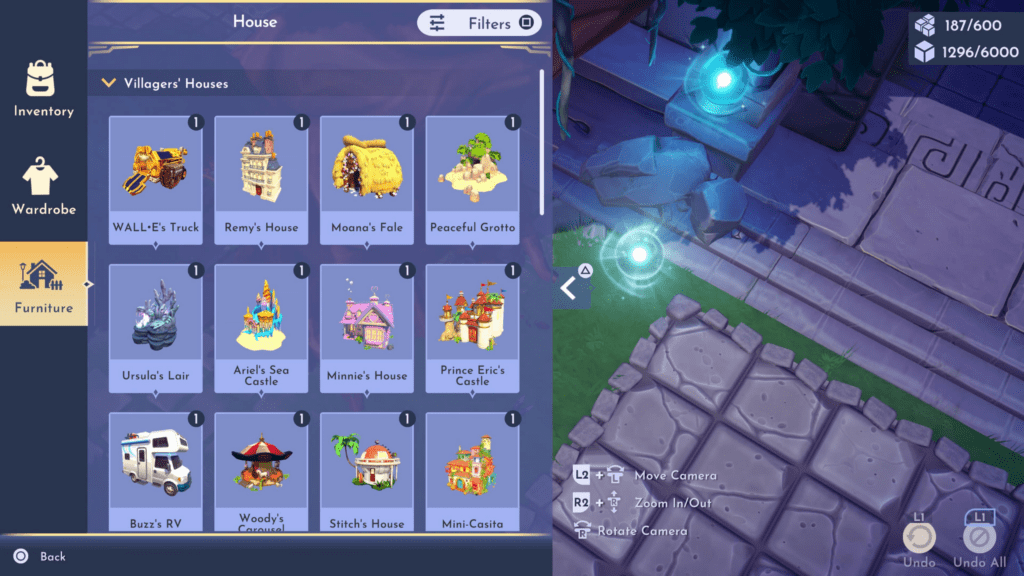
Access the Furniture tab and navigate to “Homes” to view the homes of all your unlocked villagers. Choose a home and place it in the realm you’re currently exploring to initiate the transfer.
Keep in mind that moving a home from the Valley to Eternity Isle results in a complete relocation—it won’t create a duplicate. This action permanently removes the home from the Valley, so plan your biome development accordingly.
However, it’s essential to understand that transferring a home is a one-way journey. When moved from the Valley to Eternity Isle (or vice versa), the home is entirely removed from its original location. Therefore, planning and organizing your biomes accordingly is crucial, considering the permanent nature of this relocation process.
This simple method allows players to relocate their villagers’ homes across realms. Though straightforward, it’s crucial to consider the permanence of the transfer before making any moves.
For the latest gaming Guides, Updates and News, don’t forget to visit our dedicated gaming page. GAMING GUIDES Stay informed and level up your gaming experience with our fresh content!